
What are biometrics? Biometrics are measurable physical or behavioral characteristics—such as a fingerprint, face, iris, voice, or typing pattern—that a system can compare with an enrolled record to help recognize or authenticate a person.
What are biometrics in simple terms?
Biometrics are measurements connected to traits of a person. A biometric system captures a sample, extracts selected features, creates a mathematical representation called a template, and compares a later sample with that enrolled template. It is usually checking for a sufficiently close match—not comparing two perfect photographs.
People asking “what are biometrics?” are often thinking about a phone’s fingerprint reader or face unlock. The category is broader and includes both physical characteristics and patterns of behavior.
| Category | Biometrics examples | What is measured |
|---|---|---|
| Physical biometrics | Fingerprint, face, iris, palm, hand geometry | Features of the body captured by a sensor |
| Behavioral biometrics | Voice patterns, typing rhythm, gait, touchscreen behavior | Patterns in how a person speaks, types, moves, or interacts |
Biometrics can be used for verification—“Does this sample match the enrolled user?”—or identification—“Whose sample is this among many records?” Unlocking your phone is normally verification. Searching a large database for a possible identity is identification and presents different privacy, accuracy, and governance concerns.
What is biometric authentication?
Biometric authentication uses a biometric comparison as part of deciding whether to grant access. A typical process looks like this:
Enrollment
The sensor captures one or more samples and converts selected features into a reference template. Enrollment quality affects later matching.
Capture
During an unlock or sign-in, the sensor collects a new fingerprint, face, iris, voice, or other sample.
Comparison
The system compares features from the new sample with the enrolled template and calculates a similarity score.
Decision
If the score meets the system’s threshold and other security checks pass, the device or service accepts the match.
Authorization
A successful local match may unlock a phone, approve a payment, or authorize a protected cryptographic credential such as a passkey.
The original image is not always kept. Well-designed systems may store a protected mathematical template and perform matching inside security hardware. Implementation matters: some systems match locally on a device, while others collect or compare biometric information centrally.
Five main biometric authentication methods
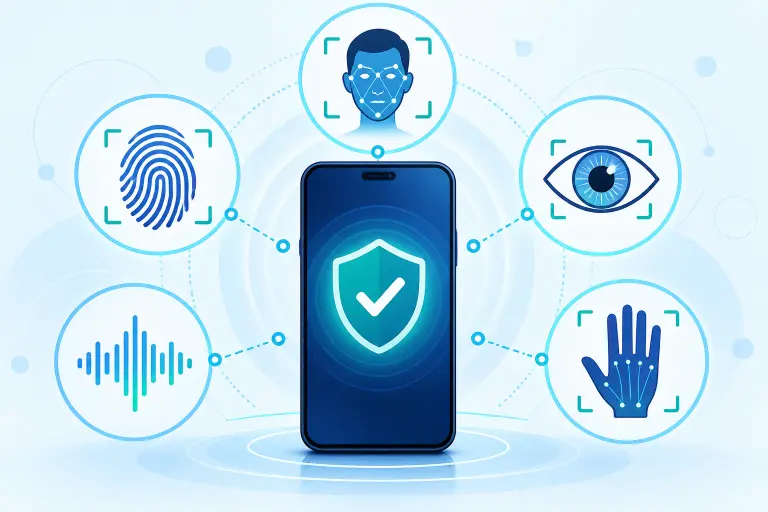
There is no single universal list of exactly five types of biometrics, but these are five widely recognized biometric authentication methods:
1. Fingerprint authentication
A fingerprint sensor measures ridge and valley patterns or related features. Fingerprint authentication is common on phones, laptops, access systems, and security keys. Cuts, moisture, dirt, sensor quality, and enrollment quality can affect matching. A latent fingerprint can also be left on touched objects, which is one reason biometrics should not be treated as secret passwords.
2. Facial recognition authentication
Face authentication measures selected facial features. Systems vary greatly: stronger implementations may use depth or infrared sensing, attention checks, and presentation-attack detection, while simpler camera-only face unlock may provide less assurance. Facial recognition authentication for unlocking one enrolled user is different from searching a database to identify people.
3. Iris recognition
Iris systems analyze detailed patterns in the colored ring around the pupil. Iris recognition is distinct from a basic photograph of the eye and from retina scanning. Specialized sensors and capture conditions can provide accurate comparisons, but deployment quality and template protection still matter.
4. Voice biometrics
Voice systems analyze characteristics and patterns in speech. Background noise, illness, recording quality, replay, synthetic audio, and natural voice changes can complicate use. Voice recognition for authentication is different from speech recognition that merely converts spoken words into text.
5. Hand or palm biometrics
These methods can analyze hand geometry, palm prints, finger or palm veins, or combinations of features. Some require contact with a reader, while others use optical or near-infrared sensing.
Other types of biometrics include gait, typing rhythm, signature dynamics, ear shape, and patterns of device interaction. Behavioral signals may be used continuously and can raise additional transparency and consent questions because the user may not perform an obvious authentication gesture.
What are biometrics on a phone?
On a phone, biometrics usually means a fingerprint or face measurement enrolled to help unlock that particular device. Depending on the platform, a successful match can also authorize app access, payments, password-manager access, or use of a passkey.
The website you visit does not normally receive your fingerprint or face when a device biometric unlocks a passkey. The biometric check happens locally, and the website receives a cryptographic response from the credential. Google says biometric data used to unlock a Google Account passkey stays on the device. Apple says its Face ID and Touch ID templates are encrypted for its Secure Enclave, are not sent to Apple, and are not included in device backups.
Are biometrics safe?
Biometric security can be strong when it is implemented well, but “biometric” is not a quality guarantee. Security depends on the sensor, matching algorithm, false-match threshold, presentation-attack detection, template protection, enrollment process, fallback method, and what the successful match is allowed to do.
NIST emphasizes that biometric characteristics are not secrets: faces may be photographed, fingerprints may be left on objects, and other traits may be observable. Unlike a compromised password, your natural fingerprint or face cannot simply be replaced. This is why modern guidance treats biometric data as sensitive and uses it together with a physical authenticator rather than as an independent secret.
Two important biometric errors
- False match: the system incorrectly accepts a sample from the wrong person.
- False non-match: the system incorrectly rejects the enrolled person.
Tightening a matching threshold may reduce false matches but can increase false rejections. Vendors and evaluators must consider both performance and attack resistance across expected users and conditions.
Can fingerprint or face authentication be hacked?
Any authentication system can face attacks. Biometric threats include stolen templates, weak enrollment, sensor substitution, coerced unlocking, and presentation attacks using an artifact or imitation. Liveness and presentation-attack detection are designed to recognize some spoof attempts, but their effectiveness varies. Device updates, attempt limits, secure hardware, and a strong fallback all contribute to protection.
Biometrics vs passwords, 2FA, and passkeys
| Method | What it proves | Important distinction |
|---|---|---|
| Password or PIN | Something you know | Can be changed, but may be guessed, reused, stolen, or phished |
| Biometric | Something you are | Convenient, but not secret and cannot be replaced like a password |
| Device or security key | Something you have | Possession must be protected and recovery planned |
| Passkey | Possession of a cryptographic credential, often with local user verification | The biometric may unlock the credential; it is not sent to the website |
A biometric check is not automatically two-factor authentication. A phone may combine possession of the device with a local biometric check, but the exact factor classification depends on the system and assurance model.
Biometrics and passkeys are also not the same. A passkey is a cryptographic credential for a particular account and website. Your fingerprint or face can authorize the device to use that credential, just as a device PIN can. The legitimate website verifies the cryptographic result rather than comparing your body measurement.
Biometric privacy and practical precautions
Before enrolling, understand what data is collected, whether matching occurs locally or centrally, who controls the template, how long it is retained, whether it is shared, how it can be deleted, and what non-biometric alternative exists.
- Use biometrics only on devices and services you trust.
- Choose a strong device PIN or passcode; do not rely on a four-digit fallback when a stronger option is practical.
- Keep the operating system, security firmware, and apps updated.
- Review which fingerprints or faces are enrolled and remove entries you do not recognize.
- Use remote-lock and remote-erase features for a lost device.
- Prefer local matching and clear data controls when available.
- Keep account recovery methods protected and current.
- For important accounts, favor phishing-resistant passkeys or security keys when supported.
Frequently asked questions
Select a question to open or close its answer.
What are biometrics?
Biometrics are measurable physical or behavioral characteristics, such as fingerprints, facial features, iris patterns, voice characteristics, or typing rhythm, that systems can compare for recognition or authentication.
What is biometric authentication?
Biometric authentication uses a captured biometric sample and an enrolled template as part of deciding whether a person should receive access. It is commonly used to unlock a device or authorize a credential stored on that device.
What are five main types of biometrics?
Five common categories are fingerprint, facial, iris, voice, and hand or palm biometrics. Other methods include gait, typing rhythm, signature dynamics, and patterns of device interaction.
Are biometrics safer than passwords?
They have different strengths and weaknesses. Biometrics are convenient and cannot be forgotten, but they are not secret and are difficult to replace. Strong systems combine biometrics with a protected device or credential and retain a secure fallback.
Does a website receive my fingerprint when I use a passkey?
Normally no. The biometric check unlocks the passkey locally on the device. The website receives a cryptographic response showing that the correct credential authorized the sign-in.
Can I change my biometric data after a breach?
You cannot replace your natural face or fingerprint like a password. A well-designed system protects templates and lets you revoke the associated device or credential. Treat biometric information as sensitive personal data.
Sources and further reading
- NIST Digital Identity Guidelines: biometric authentication requirements and risks
- NIST: false matches, false non-matches, and presentation attacks
- Apple Platform Security: biometric security
- Google Account Help: biometrics and passkeys
Biometric designs and device capabilities vary. Review the current documentation and privacy controls for the specific product or service before enrollment.